

Product
User management in SAP systems is a significant challenge for many companies and is becoming increasingly complex due to growing security requirements. Additionally, the high administrative effort required to transparently manage identities and authorizations in SAP-ABAP systems adds to the complexity. Numerous manual interventions, such as creating, authorizing, and locking users, further increase the risk of errors.
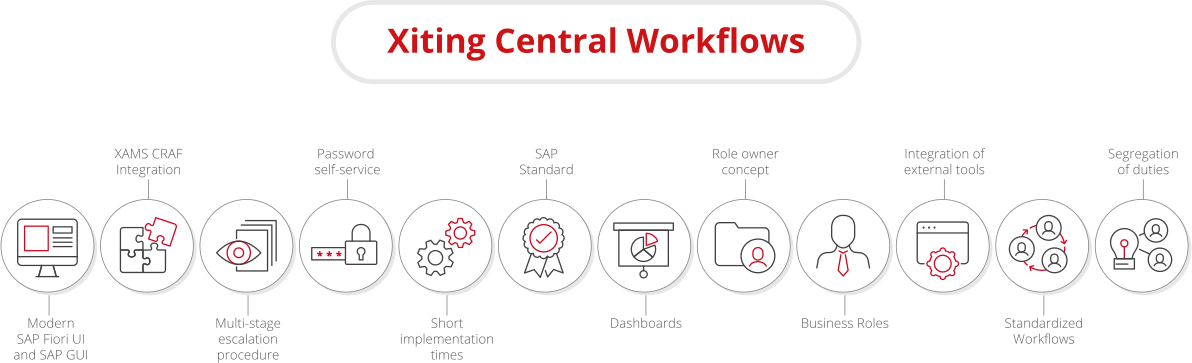
Hello, and welcome to the webinar. Questions during the webinar can be posted in the chat. These will be answered within the next few days. Yes. My name is Valerie. I am an employee of exciting and work in the consulting unit, sub identity and access management. Today's webinar is about exciting sample workflows, x c w for short. And it's a tool for standardized workflows and self-service for your user administration in SAP ABAP systems. We will start, with the facts about the company, then move on to the challenge, then move on to the actual solution. And before we look at the XCW in the system, I will introduce you to some benefits. And after that, we jump into our demo system. Yeah. Before we start with the topic, let me briefly introduce exciting, who we are, what we want, and where we are from. Exciting has been around since two thousand eight. We were founded and still headquartered in Switzerland. We have offices through Europe, in Germany, Switzerland, UK, Romania, and in the United States since two two thousand sixteen. Exciting, specializes in SAP security. We are SAP gold partner. We provide services in form of consulting and helping customers with, role redesigns, S4HANA migrations, GRC implementations, IDM, SSO, and other SAP security related tasks. We also provide tools as part of our portfolio that are fully certified by SAP. Everything we do is one hundred percent SAP standard. This is also allows us to be fully certified for the cloud and the other topics. Let's come to the portfolio. Yeah. Here's a brief overview of our security solutions and consulting services. Our core business is clearly around roles and authorization management, and we also cover topics such as SAP ETD or SEM integrations. Also, the SAP cloud is a big area with very much use cases, and our focus here is, clearly on identity access management with exciting Stanford workflows, our own product we see here. And, yeah, for further questions about our company and portfolio, you are welcome to get in touch with us if you want, to know more. And that's it for this part. Now we come to the challenge. How did we come to develop the XCW in the first place? We heard the same issues over and over again from different customers. Call requests are often made manually by call or email or sometimes via ticket system, but, yeah, with manual steps. It's often very difficult to subsequently trace the reason for the request. There's also no regulated, retention of the request, and there are no explicit approval procedures or response And it's also often very difficult for customers to name specific roles. We have often heard something like, I need authorizations like user ABC or the user must be able to book or something like that. And all those together led us to develop the XCW. In addition, we wanted to make it easier for the help desk and develop a password type service, which is delivered with the XCW because the manual resetting of passwords creates unnecessary effort. And, yeah, we wanted to reduce that. Now let's turn on, to the target group who are XCWs aimed at. Basically, customers with small to medium sized landscape, but that depends on the individual structure of the system. We have also customers with, yeah, big system landscapes, and it also works. Yeah. We want to get to customers who want to automate their user creation, modification, and role assignments, role replication, customers who want to manage their ABAP systems in terms of of users and role assignments, customers who want to implement authorization checks, and customers who need to preintegration of critical authorization and SODs for the road supported by XMS craft. But, yeah, maybe you know our tool, XAMS. XCW is part of the XMS. It's a mod module, And there's another interesting module. All modules are interesting for sure. But, in in this use case, we have the like, six ms as graph. Graph critical authorization framework is a framework for for, analyzing roles and users for critical authorization and critical combinations. And, yeah, we, deliver within the craft, a large number of rule define definitions as well as variants that can be used for the checks. Of course, you can only, create your own rules and variants. Yeah. That's also possible. And with the XCW, we, yeah, get in contact with the graph and have the functionality to approve the roles before the roles should be assigned to the user. Let's move on to the presentation of the XCW, our solution. XCW is an independent product in your ABAP system landscape and does not require its own service or similar. XCW is imported into a system defined by you via transport request. XCW can also serve as a pre project for the implementation of SAP IDM or another identity access tool. And, for example, if due to regulations of past solution for automation, their ABAP system is needed, because implementation of the XCW takes only a few days. So now let's come to the implementation scenario. There are three options. The first option, XCW in the custom defined system landscape. Here, all the requests must be made in the central system. The second scenario, is used when you use a CUA. And, here the request and that, yeah, maybe a benefit can be made also from the child system. In both cases, provision is made after the last approval, and provisioning means here that the users created or changed in the specified systems, all the roles are assigned or revoked. And we have a third variant, the local variant. XCW runs your stand alone, and it's perfect for customers to get to know the tool, maybe in form of a proof of concept or something like that. Now let's move on to the actual workflows. There are two types of requests. One is the user request, create new user and make changes to the user. On the other hand, there are role requests. Roles are requested and revoked. Additionally, there's the combination of both requests. For this, the request is split in the background. First, the request is approved by the user owner. And then in the second step, roles are approved by the role owner. Substitutes and further approval steps can also be maintained. And now we come to, to this slide. The customer has decided to use the XCW, and this is how it works. The customers gives us his installation number after which we can generate keys and then deliver the transports via with the license key. The customer imports the transport and install the license. Then the workflow can be activated in the general settings, as well as the RC connections and authorizations are made, and we do that together in a workshop. Then comes to the, yeah, to the heart of the XCW, the customizing. This is where you d, where you define how the workflow should behave. In addition, for example, user owners and role owners are maintained. User owners are the persons who are responsible for the creation or modification of users, and role owners are the persons who are responsible for the assignment and verification of roles. Now we come to the functionality of the workflow. We have different possibilities to start them. Automated from HR, from SAP HR, in the application directly via ad hoc search to be able to pick up the data you see from the active directory or another tool, which is which is supported via, LDAP. It's LDAP search. And the other possibility are the, external tools. And that means other identity, access management tools or ticket tools like ServiceNow or something like that. And, yeah, depending on the scenario, the requests are then administrated in the, administrated centrally in the XCW. And from the XCW, the provision starts, automatically and provisions into the target system, the user and the roles. And that's, yeah, that's the functionality. And now before we jump into the system, let me summarize the benefits of the XCW. We have the modern UI. You I don't speak about that, but we see that now. We have, the SAP standard GUI, and we have also modern SAP Fiori UIs. We have also the integration with XAML Graph. And, yeah, with Graph, you can directly check role requests for critical authorizations for SODs. We have the, multilevel escalation process. This is optional. Multi levels of approval can be done after another. We have the password theft service. Password theft service is a web service, and users can reset their passwords and unlock them thefts if needed. We have the, short implementation time. We have SAP standard. XBW is completely implemented in SAP standard. This can be seen, for example, in the SAP workflow or the RFC connections. So it's possible to use, transaction SVVP as a business workplace to, approve the request or the Fiori work list. That works. XCW is completely in SAP standard. We have dashboards. There are dashboards for all workflows where you can see where are the request to a next approval and the status. Role ownership concept, XCW provides you with a detailed, role owner concept, including substitute regulation, because the system need to know which is the person who are responsible for users or for roles. We have the integration of external tools. It's the possibility to use other identity access management systems or ticket tools or something like that to start a request. We have, the creation of duty, fourth ice principle is maintained, and you are audit compliant. And now we come to our demo. I would like to go through the following use cases, user and raw requests in Fiori UI, risk manager approval in Fiori, and user change via web service. And that's a good point. User change via web service. What did we use as an external tool? Yeah. It's something special because we use Postman. Postman is a tool which is designed for developers and, while its user interface might appear a little unusual, it's a powerful tool for simulating our SOAP web services. For your purpose, it does imagine, will be required and what we are about to explore if this developer oriented tool needs to be visualized within your own ticket or I or identity access management tool, which is more user friendly and, yeah, better to use. But for our case, we use this tool, Postman. And now we start with our demo. Log on to our launchpad with my own user and change the language. Sorry. And go to that request. It's a request for user creation and role assignment. In the first step, we have to decide it which is the role the user owner. Sorry. The user owner is the person who is responsible for the user creation and, user changes, and we decided to use that user. In the next step, we enter the user information. Here we have different options available. We can, upload a CSV file or create the user manually. For our demo, we create the user manually. So I click on add user, and I add the user John Doe. John Doe is a dialogue user with a last name Doe and the first name John and with the email address, go at exciting dot o s. The fields which are available here, are fields from s o zero one. You can define which fields you want to see here and, the fields with the with with the red star are, are, sorry. I can't find the word. A mandatory. Sorry. A mandatory field. And now we add the user. In the next part, we have to decide it to which systems we want to, we want to add the user and which role it should be assigned. There's, an automatically, functionality because we only need to define which role should the user become and then the sections will be automatically filled. So we do that. Let's go to assign, decide about the user, and decide about the systems in which we want to search for roles. And then we come to the role selections. Here, I can, search for the roles with the role name. I can search for the role title. I can search for transactions or I can search for other user. And in our case, we want to search for another user, this person, and go. And now we got the information. This person has roles in three systems and two and, two roles for every system. And our user should be become the same roles. I can check that here. Go to next. And now I can set the validity. I don't want to do that. So it's from today to, the SAP standard date. It's like this. Yeah. You know, it's a SAP standard for low quality team. Overview. I got the information here. And let's click on finish. The roads were transferred to the request. And also this section is filled automatically and the user John Doe will be created in these three systems with these six roles. I can add also an attachment. The this attachment is available for the, for the approver. And I can add comments, for example, something like that. Employee or something like that, and click on send request. With click on send request, the approver get, email comments, and, yeah, they were informed via email and get all the information in the email and can decide it what they want to do. Yeah. I got some information because my user was removed from the risk managers. Yeah. You know, Forsyth's principle. We can't, yeah, I can't do the decisions about the request because I want the requestor. Close. And now I out. No. I don't have to do that. I open a new window and log on with the user owner user because, this is the person who needs to decide about the about the user creation. User own. And language, English. Sign in. And now in my inbox, I got a new request. It's about the user creation. We see here the information. User John Doe, should be assigned, should be created and assigned to these three systems. As a approver, I have, different possibilities to different options to decide it, what should happen in the request. I can approve all. I can approve only one user, one user in one system, or I can reject all. In our case, we want to approve all. Confirm. And now the user will be created in the system. Okay. Now in the next step, we have to log on with our role owner. Sign out and sign in with the with the role owner. English. Sign in. Not sorry. Roll on. And there we have also a new icon, a new, yeah, a new approval in our inbox. It's about the, the role. Yep. The it's about the roles. And when you remember, we have requested six roles, but only two roles needs to be needs to be approved via the road owner because the, other roads are approval free. But in the next step, in the risk manager step, we see the roads again. Because I've choose roads which, leads to a conflict, and that means that they don't get, they don't have to be assigned, automatically. They have to be approved via the list manager. But for now, we are in the role owner step, and there we see our user. We see our two roles, and we have the same possibilities. We can approve, approve selected, or reject all. We would see the attachments if the, requester give us an attachment. We can do a comment for the request, and maybe it's okay or something like that. And now we approve all. Confirm. And now in the next step, we have to log on with the risk manager to do the approval as a risk manager. Sign out. Okay. Some problems with the system. One moment, please. Sign out and log on with the list manager. English two hundred and log on. And we have a new item as the risk manager. We get the information here, about the request, the information the the reason of the request. And here, we got the information about the conflict. With few more, we got more information about the risk. We see which role is affected. There we see there are more than our approved roles. There are also our approval free roles, and we got that some informations about the conflict. Role alone contains conflict, means that there are some, yeah, some strange things in the role directly. Maybe our, yeah, our responsibilities for the roles, as a little work here, or we get the information, causes no conflict when role alone. That means this role leads to a conflict with other roles. And my job as a, risk manager is to decided about that. I have, different options. I can approve all. That means that, the roles will be assigned to the user. But when, in the next days, the user, requested a new role, which leads to the same conflict, I have to approve it again. There is another option. It's a concept of mitigation. Maybe you know that. Mitigation in our, case here means that the risk manager can do this mitigation. And that means that there, that we decided that this conflict is fine for maybe one month because the user do some, some task for another person who is on vacation or something like that. And when we do the mitigation means that when the user requested a new role in two days, which leads to the same conflict, we as risk manager don't have to approve that because it's mitigated. It's fine. Yeah. The role for for a for a defined time is okay. The risk for a defined time is okay. In our case, we approve all, and, that means when the user requested roles with leads to the same conflict in the next days, we have to approve it again. Approve all. Confirm. And now in the background, the provisioning starts and the user is still created, but the role, will be assigned now. Okay. Now we come to our last part for today, the user change. Yeah. Now let's jump into Postman. We talk about that. We have here the, soft web service for user change. And now we want to, set a validity to the user, and we want to change the first name and also the email address. It's for demo, purpose. Alongside, we include reason. It will be relevant for, some auditing processes later, And we also can adhere the specified user owner, the person who is, responsible and should do, should approve this, change. With click on send, the request is simulated, providing us with relevant information about the process. And we got a response here. Virtual started in system. We got information about the work item, which we can use in another, in another web service for get information about the status. And, yeah, we can, review this information later if we need that. Okay. Let's switch again to our Fiori interface and log on with the user owner. XCW user own. Client. And now we see there is a new request. The request that is our is our user, which is, defined on the, SOAP web service. We got the information here, and there we got the information to the user change. We set a validity. We changed the email address, and we also change the first name. And now we can approve that. And we got the same possibilities. We can approve, we can approve selected, or we can reject. In our case, we want to confirm that, and now the workflow is successfully processed. Yeah. We have now gone through our use cases, and, yeah, I look forward to hearing from you. Have a nice day.
Standardized Workflows and Self-Services for your User Administration in SAP Systems
XITING CENTRAL WORKFLOWS IN DETAIL
Many customers use SAP’s Central User Administration (CUA), which eliminates the need for local user management.
However, SAP no longer develops CUA, so certain features like workflows or self-services are unfortunately unavailable.
→ Xiting Central Workflows (XCW) was specifically designed to address this challenge.
XCW provides the capability to streamline user management in SAP-ABAP systems through standardized workflows for user management, role assignment/removal, user creation including role assignment, and password self-services. XCW can be utilized in three different scenarios: without Central User Administration (CUA) in a separately defined system landscape, alongside CUA, or locally in individual systems.
Through comprehensive customization, you can leverage our standardized workflows while adapting them to meet your company’s specific needs. For example, you can easily create multi-level approval procedures or role owner concepts with just a few clicks. Additionally, the use of business role concepts simplifies workflow utilization significantly. XCW integrates with the SAP standard without modifying it, using the standard in some areas while keeping the core intact.
Discover our innovative approach to the seamless integration of Xiting Central Workflows (XCW) with SAP Cloud!
Through standardized workflows and customized settings, you will receive a streamlined solution for user management in your SAP system landscape. Additionally, you will have access to a password self-service web service. With XCW, you offer your users a modern user experience through our SAP Fiori interfaces, and real-time workflow overviews are provided in the dashboards.
With XCW, you simplify and automate your processes, achieving a functional separation between applicant, approver, and executor. The integration of XAMS CRAF allows you to analyze roles and users for critical permissions and critical combinations.
With the introduction of business roles, you receive containers with cross-system permissions that are managed within XCW customization. End users will only need to request business roles in the future, which can be easily found through simple search options.
News
Discover the latest enhancements in Xiting Central Workflows (XCW) Service Pack 6 – including a Fiori dashboard, business role, performance optimizations and a new SOAP web service.
With two new releases – Service Pack 5 Feature Fix (SP5 FF) and Service Pack 6 (SP6) – we continue to evolve our product Xiting Central Workflows (XCW) for the SAP IAM space.Â
XAMS supports companies in their security projects by automating costly and time-consuming tasks, improving compliance adherence, and significantly reducing the risk of errors.
Discover the key use cases of the Xiting Security Platform (XSP) that will revolutionize your SAP security management with comprehensive coverage, seamless integration, and advanced analytics.
The Xiting Content Portal (XCP) is a SaaS solution that provides a central SAP risk repository and a user interface for the straightforward creation and management of rule sets, supported by a collaborative community approach.
You are currently viewing a placeholder content from Vimeo. To access the actual content, click the button below. Please note that doing so will share data with third-party providers.
More InformationYou are currently viewing a placeholder content from YouTube. To access the actual content, click the button below. Please note that doing so will share data with third-party providers.
More InformationYou need to load content from reCAPTCHA to submit the form. Please note that doing so will share data with third-party providers.
More InformationYou are currently viewing a placeholder content from Facebook. To access the actual content, click the button below. Please note that doing so will share data with third-party providers.
More InformationYou need to load content from hCaptcha - Formidable to submit the form. Please note that doing so will share data with third-party providers.
More InformationYou need to load content from reCAPTCHA to submit the form. Please note that doing so will share data with third-party providers.
More InformationYou need to load content from Turnstile to submit the form. Please note that doing so will share data with third-party providers.
More InformationYou are currently viewing a placeholder content from Hubspot Meetings. To access the actual content, click the button below. Please note that doing so will share data with third-party providers.
More InformationYou are currently viewing a placeholder content from Instagram. To access the actual content, click the button below. Please note that doing so will share data with third-party providers.
More InformationYou are currently viewing a placeholder content from X. To access the actual content, click the button below. Please note that doing so will share data with third-party providers.
More Information