SAP S/4HANA Authorizations

The migration from SAP ECC to SAP S/4HANA brings new challenges for SAP S/4HANA authorization management. The key reasons for this include major changes such as the introduction of the HANA database, which has led to adjustments in the table structure, the centralization of transactions, and the Fiori Launchpad, which has now become the new primary user interface. In addition, older applications are replaced by new ones – for example, transaction BP, which is now used to maintain vendor and customer master data. All of these changes require adjustments to the SAP S/4HANA authorizations.

What to Keep in Mind for Authorizations in S/4HANA

SAP S/4HANA authorizations are a critical component of system security. They control which functions users can perform and which data they can access within the SAP S/4HANA system.

As in SAP ECC, authorizations in SAP S/4HANA are defined and assigned through a role-based concept. This ensures that each user can only access information relevant to their tasks – making authorizations a key contributor to system security and compliance.

Why is an Authorization Migration for SAP S/4HANA Important?

The S/4HANA Business Suite introduces architectural changes in database technology and extends product variants through cloud solutions. It also provides many new functions for the on-premise version.

Since some transactions are removed, no longer supported, or replaced by SAP Fiori applications during migration, SAP S/4HANA authorizations must be adapted to reflect these changes.

The Simplification List for SAP S/4HANA documents the relevant changes for each S/4HANA release that affect the authorization concept and may also require process-level adjustments. Key technological changes include:

  1. Simplification approach: the “Principle of One” design concept results in a leaner SAP system. The elimination of aggregate tables reduces data redundancy.
  2. SAP HANA database: in-memory database technology enables faster data processing. Combined with changes to the table structure, this improves overall system performance.
  3. System optimization: migrating SAP S/4HANA authorizations contributes to system optimization by removing redundant or outdated authorizations.
  4. Fiori Launchpad: the Fiori Launchpad becomes the central user interface, and some transactions are replaced by Fiori apps. Fiori catalogs group apps that belong together thematically or functionally for a given process or role (e.g., all apps for the “Operational Purchasing” function). These apps are then visually organized through Spaces and Pages – or Groups in older S/4HANA releases.
  5. New functions and roles: SAP S/4HANA introduces new functions that sometimes require adjustments to business processes and, consequently, to roles and authorizations. The migration ensures that all users have the necessary access rights for new features.

For these reasons, a simple transfer of the authorization concept from SAP ERP 6.0 to SAP S/4HANA is not possible. The migration requires a review of existing SAP S/4HANA authorizations and therefore differs significantly from a standard ERP upgrade.

What are the Challenges of the SAP S/4HANA Migration for Authorizations?

The migration to SAP S/4HANA presents organizations with significant challenges – especially when it comes to authorization concepts. Not all applications continue to work after the transition, which means that authorization roles need to be adjusted.

Some transactions from older SAP systems no longer exist in SAP S/4HANA, which means that new transactions must be added and correctly integrated into the SAP S/4HANA authorization concept. Errors in the migration can lead to operational disruptions or unauthorized access to sensitive data.

Process adjustments are also frequently required due to new functions. Users need to familiarize themselves with the new interface and revised transactions. This makes adapting SAP S/4HANA authorizations a time- and resource-intensive process.

What Migration Options are Available?

Three different strategies are available for the SAP S/4HANA migration: Greenfield, Brownfield, and Bluefield. For a detailed side-by-side comparison, see our SAP S/4HANA Transformation article.

  • Greenfield: a new SAP S/4HANA system is set up or migrated from a non-SAP system. This approach requires the authorization concept to be created entirely from the ground up.
  • Brownfield: an existing SAP ERP system is converted to SAP S/4HANA. In this approach, existing authorization roles are typically retained and adjusted only for S/4HANA-relevant changes.
  • Bluefield: a hybrid approach that consolidates multiple SAP ERP systems into SAP S/4HANA, migrating selected data while excluding the remaining data from the migration. This allows for targeted cleanup of legacy issues with less effort than the Greenfield approach.

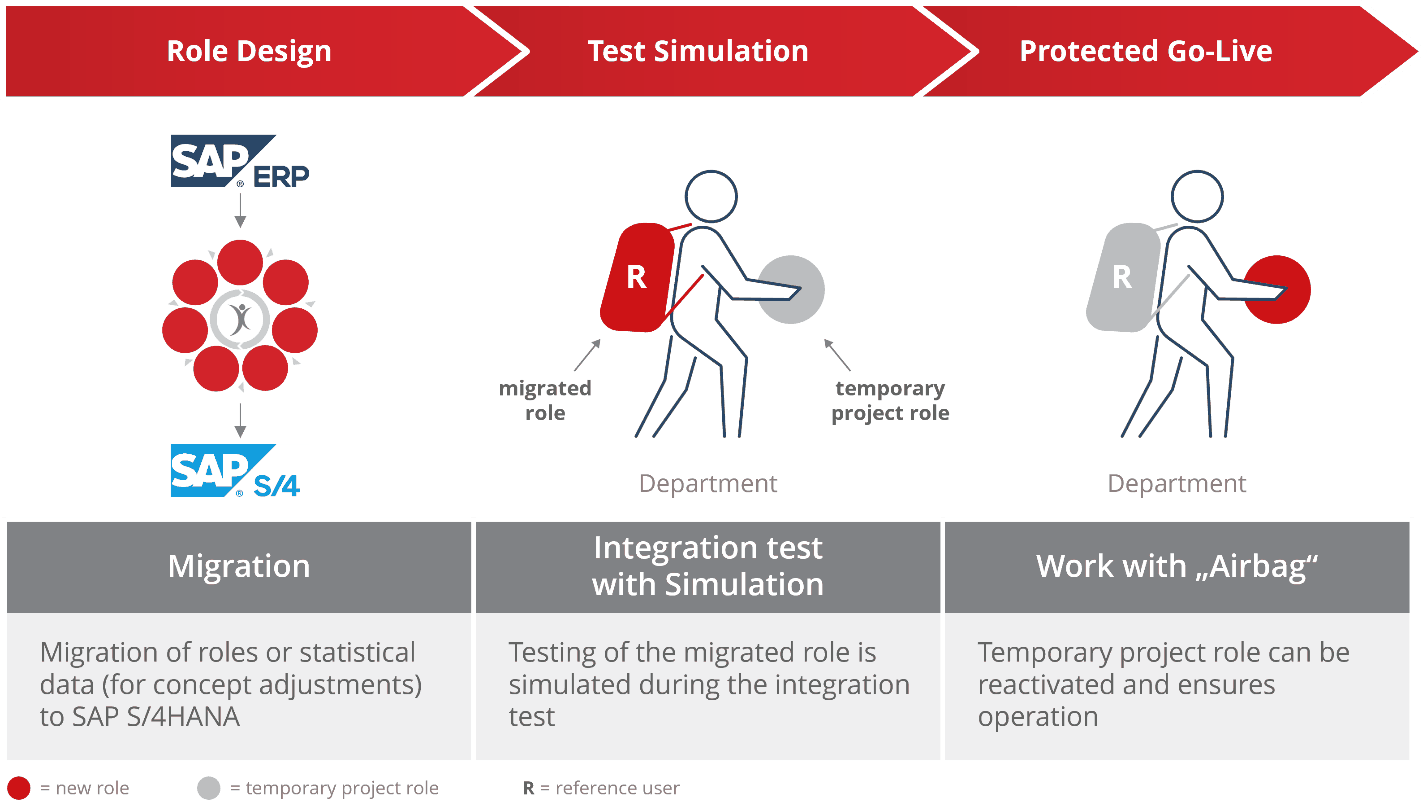
Example of an S/4HANA Authorization Migration

The following diagram illustrates how an authorization migration can be structured:

Migrating Successfully with XAMS

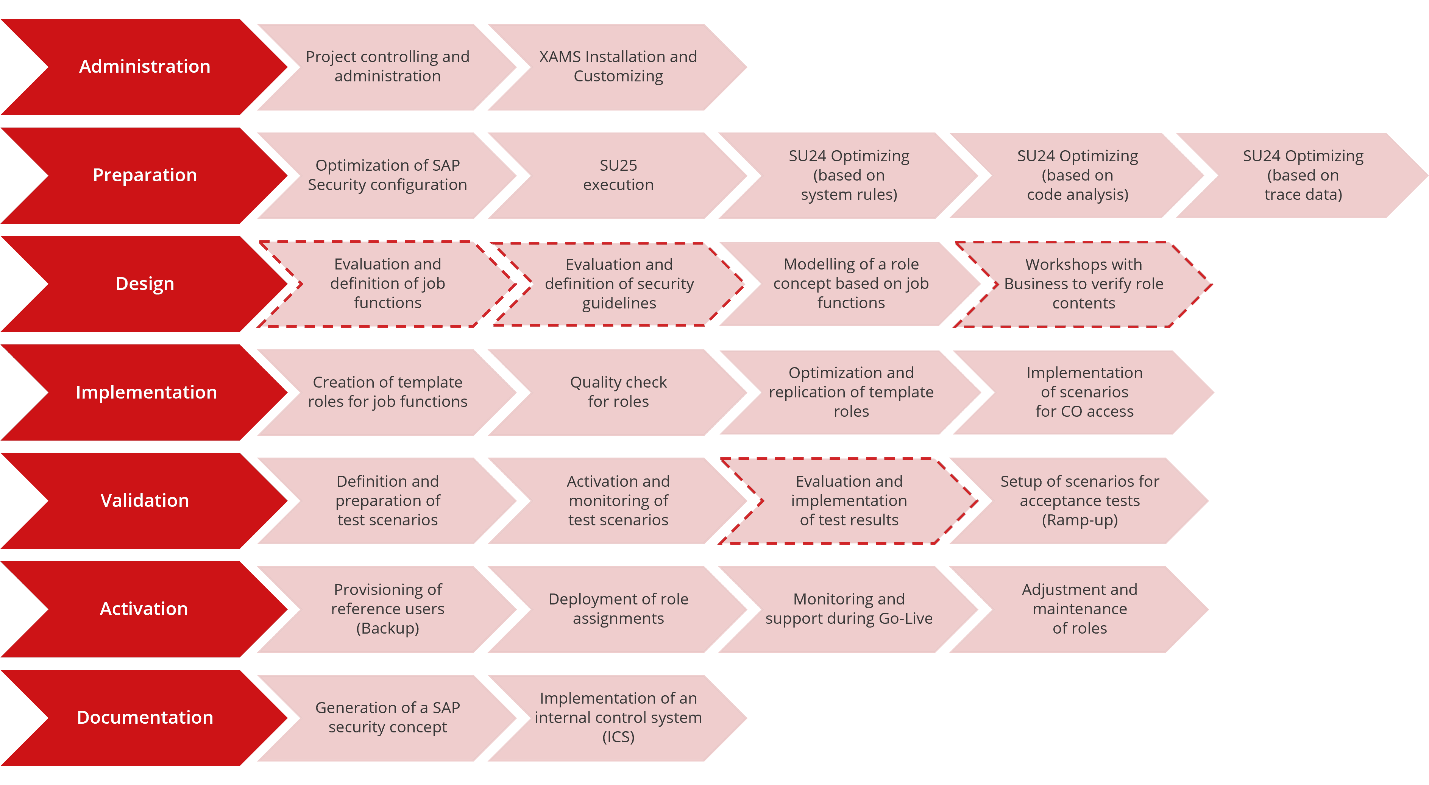
Xiting supports your SAP S/4HANA migration with the Xiting Authorizations Management Suite (XAMS). XAMS makes the transition significantly easier – especially when it comes to aligning with the Simplification List, revising your SAP S/4HANA authorizations, introducing Fiori apps, testing, and go-live.

FAQ

What are SAP S/4HANA Authorizations?

As in previous SAP systems, authorizations in SAP S/4HANA control which actions a user is permitted to perform in the system. An important extension to the authorization concept is required when Fiori apps are used, since both the frontend and backend components must be configured correctly.

A clean SAP S/4HANA authorization concept ensures that every user – through the roles assigned to them – has only the access rights they actually need for their tasks. This avoids unnecessary authorizations and improves security. For S/4HANA, an adapted authorization concept is mandatory due to system changes – especially in the area of Fiori apps.

Since SAP is ending mainstream support for older ERP systems in 2027, migrating to SAP S/4HANA is unavoidable for organizations that want to continue using SAP. Beyond the deadline, the new platform offers advantages such as improved performance, new functions, and a modern user interface.

The Fiori Launchpad is the user interface and central entry point for SAP S/4HANA, providing access to all Fiori apps. It acts as a central starting point for users and plays an increasingly important role in S/4HANA. The Fiori Launchpad is:

  • User-friendly
  • Web-based, but also accessible on smartphones and tablets
  • Role-based
  • Personalizable

Fiori apps are used to perform functions in S/4HANA. There are 3 types:

  • Transactional apps: allow you to carry out a business process – for example, placing a purchase order.
  • Analytical apps: provide real-time insights and visualizations through dashboards – for example, to analyze sales figures for a specific time period.
  • Fact Sheet apps: deliver detailed information on specific objects such as orders and provide further insights through drill-down functions.

Stay up to date

Subscribe to our newsletter to receive further information.

Follow @Xiting and @xiting.global on social media.

Zumtobel Group

Efficient SAP Role Redesign with XAMS as a Catalyst for the S/4HANA Migration at Zumtobel Group