

Securing SAP RFC Interfaces: Definition and Optimization

One of the most common – and most serious – security vulnerabilities in communication between and within SAP systems is over-authorized RFC interface users.

Due to historically grown interface architectures, development without a defined concept, and pressure to quickly implement business requirements, they pose a risk from both inside and outside your systems. Often, there are only a small number of SAP users who are configured across a large number of RFC connections, covering various scenarios, and who – without a clear concept – are usually assigned the default profile “SAP_ALL” right away.

In this article, you will learn what RFC interfaces are, which connection types exist, and how to analyze and optimize your RFC interface architecture to address security risks.

What are SAP RFC Interfaces?

SAP RFC interfaces enable communication between SAP systems and applications as well as non-SAP systems and applications.

The Remote Function Call (RFC) describes the invocation of function modules that are executed on a remote system. In addition to this primary function, RFC is a fundamental building block for other technologies, such as IDoc processing, ALE, and BAPIs.

How RFC Communication works

The RFC interface is based on a client-server model: the calling system (client) sends a request to the target system (server), where the addressed function module is executed. The results are then returned to the client.

Within ABAP programs, function modules are called using the statement “CALL FUNCTION … DESTINATION”. The “DESTINATION” parameter references an RFC connection maintained in transaction SM59 and instructs the system to execute the function module on a remote system.

Note!

Trusted vs. Untrusted RFC

For RFC connections, SAP distinguishes between two trust models:

  • Untrusted RFC: The standard method – the user must authenticate on the target system using a username and password. The logon credentials are stored in the RFC destination.

  • Trusted RFC: The calling system is classified as trusted. The user can log on to the target system without re-entering a password. This requires appropriate configuration in transaction SMT1.

Trusted connections reduce administrative overhead but require a higher level of security awareness, as a compromised trusted system could provide unauthorized access to all connected target systems.

RFC Types at a Glance

SAP provides five different RFC types, which differ in their processing behavior and intended use. The choice of the right type depends on whether you need an immediate response, want to transfer data in a transactionally safe manner, or need to avoid system overloads.

Comparison of the 5 RFC Types

RFC Type Name Processing Typical Use Case
sRFC Synchronous RFC Immediate, waits for response Real-time queries, master data validation
aRFC Asynchronous RFC Immediate, no wait for response Parallel processing, performance optimization
tRFC Transactional RFC Exactly once, transactionally safe Critical postings, IDoc processing
qRFC Queue RFC Sequence-guaranteed via queues Dependent transactions, serialization
bgRFC Background RFC Modernized variant of tRFC/qRFC Recommended standard from SAP NetWeaver 7.0

sRFC – Synchronous RFC

The sRFC is the standard variant: the calling system waits until the function module on the target system has been fully executed. You receive an immediate response; however, the program is blocked until the answer arrives.

aRFC – Asynchronous RFC

With aRFC, the calling system continues processing immediately without waiting for a response. This enables parallel processing but requires more complex programming to handle the results.

tRFC – Transactional RFC

The tRFC guarantees that a function module is executed exactly once – even in the event of connection failures. SAP stores the call in a transaction ID (TID) and repeats it automatically if necessary. IDoc processing is internally based on this mechanism.

qRFC – Queue RFC

The qRFC extends the tRFC with a sequence guarantee: all calls in the same queue are processed on the target system in exactly the order in which they were sent. This is ideal for scenarios in which documents build upon one another.

bgRFC – Background RFC

The bgRFC is the most modern variant and has replaced the classic tRFC and qRFC mechanisms since SAP NetWeaver 7.0. It offers better performance, simplified monitoring (transaction SBGRFCMON), and more efficient resource utilization.

Which RFC Type should you use?

The choice of the right RFC type depends on your requirements:

Requirement Recommended RFC Type
Immediate response required sRFC
Parallel processing without waiting aRFC
Guaranteed single execution tRFC or bgRFC
Sequence must be preserved qRFC or bgRFC
New development starting with NetWeaver 7.0 bgRFC

Recommendation:

Need help with your RFC interface management?

Our experts are ready to solve your problem reliably.

How do you set up RFC Connections? (SM59)

Transaction SM59 is where you manage all RFC connections in your SAP system. Here you define the technical parameters, logon credentials, and connection settings for communication with target systems.

Connection Types in SM59

SM59 differentiates between various connection types depending on the type of target system:
Connection Type Description Example
Type 3 – ABAP connection Connection to another SAP ABAP system ERP → BW, ERP → SRM
Type H – HTTP connection Connection via HTTP/HTTPS Web services, REST APIs
Type T – TCP/IP connection Connection to external programs RFC server, SAP GUI
Type G – HTTP connection to external server Connection to external HTTP services Cloud applications

For communication between SAP systems, Type 3 (ABAP connection) is the most commonly used connection type. Let’s walk through the setup of an ABAP interface step by step.

Creating an SAP ABAP RFC Connection in 7 Steps

Here is how to create a new RFC connection of Type 3:

  1. Open SM59: Launch transaction SM59.

  2. Create connection: Click “Create” or press function key F5.

  3. Name the RFC destination: Assign a unique name. A proven naming convention is <SID>CLNT<client> (e.g., ERPCLNT100).

  4. Select connection type: Choose “3 – Connection to ABAP System.”

  5. Technical settings: In the “Technical Settings” tab, enter the target host and instance number.

  6. Enter logon credentials: In the “Logon & Security” tab, provide the client, user, password, and language.

  7. Test the connection: Use the “Connection Test” button to verify that the connection can be established successfully.
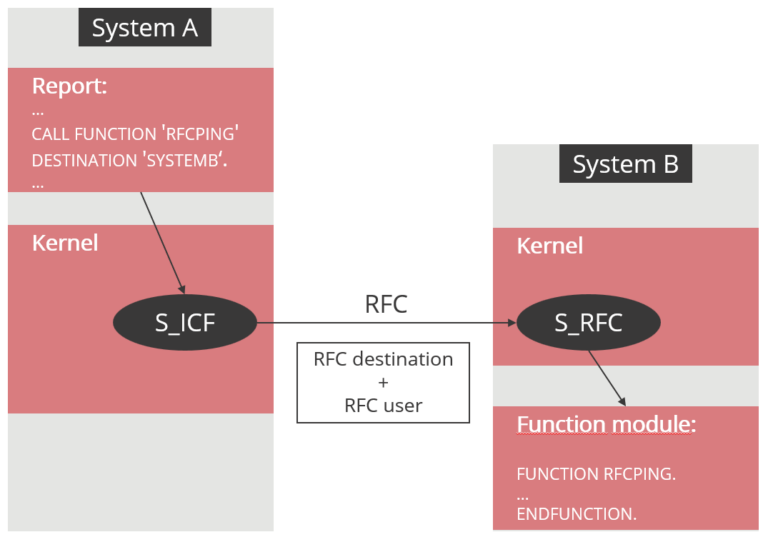
Diagram showing an RFC call from SAP System A to System B – a report triggers the RFCPING function via the S_ICF kernel module, the call is routed using an RFC destination and RFC user, and System B's S_RFC kernel module executes the RFCPING function module.
Fig. 1: RFC communication and authorization check

Did you know?

All your RFC connections are stored technically in the database table RFCDES. You can query this table directly via transaction SE16, which is useful for documentation or cross-system analyses.

Security Risks in RFC Interfaces

RFC interfaces are among the most common – and most serious – security vulnerabilities in SAP system landscapes. The core problem is over-authorized RFC interface users, which arise from historically grown architectures, missing concepts, or the pressure of fast project delivery.

In many organizations, only a small number of RFC users are configured across a large number of RFC connections. These users cover a wide range of scenarios – from BW extraction to Solution Manager monitoring and central user administration. Without a clear authorization concept, they are often assigned the standard profile SAP_ALL.

The consequences of over-authorization are system-critical:

Risk Impact
Full access to all function modules All business data can be read and manipulated
No traceability Actions are performed via anonymized technical users
Lateral movement A compromised system grants access to all connected systems
Compliance violations Audit-proof evidence cannot be provided

In the event of a cyberattack on an over-authorized RFC user, the attacker does not even need to cover their tracks. The tampering is carried out through technical users and, in hindsight, can hardly be traced back to any real person.

Info: The S_RFC Authorization Object

Whether an RFC interface user is permitted to execute a specific function module is determined by the authorization object S_RFC on the target system. It controls which function groups or individual function modules a user can call.

The problem: if S_RFC is assigned with a wildcard (*), the user can execute all RFC-enabled function modules in the system. In combination with other critical authorizations, this creates major security gaps in your SAP landscape.

Common Vulnerabilities in Practice

When analyzing RFC architectures, we regularly encounter the following vulnerabilities:

VulnerabilityRisk
Generic users (e.g., DDIC, SAPCPIC)Stored in multiple systems; difficult to authorize with tailored roles
No usage conceptUsers are reused across different scenarios
Missing naming conventionPurpose not identifiable; documentation impossible
Wrong user typeDialog logon possible even though only RFC access is intended
Outdated connectionsDestinations no longer in use remain active

We will now show you how to analyze and optimize your SAP RFC interfaces so that your system remains secure or becomes secure.

Analyzing RFC Interfaces

Before you can close security gaps, you need to understand the current state of your RFC architecture. A systematic analysis will show you which connections exist, which users are configured, and where action is needed. You should analyze the following factors:

  • Systems and clients in the SAP landscape
  • Active RFC interface users
  • Function modules called per RFC interface user
  • Number of RFC destinations
  • Active RFC scenarios (e.g., Solution Manager monitoring, central user administration, BW extraction, etc.)

Did you know?

With the Xiting Authorizations Management Suite (XAMS), you can perform the required RFC analyses efficiently and centrally. This saves time, reduces resource consumption, and minimizes your costs.

Client-Side vs. Server-Side Analysis

In RFC analysis, we distinguish between two perspectives – client-side and server-side:

  • Client-side:
    Question: Which RFC connections are configured in my system?
    Data source: Transaction SM59, table RFCDES

  • Server-side:
    Question: Which systems have called RFC function modules on my system? Data source: ST03N statistical data

→  The client-side analysis gives you the foundation. You learn which connections exist between your SAP systems.

The server-side analysis supplements this picture with information about which function modules have actually been called and from which systems the calls originated.

Client-Side Analysis with RSRFCCHK

Transaction RSRFCCHK (or the report of the same name) is available on every SAP NetWeaver AS ABAP. It presents the connection information from SM59 in an evaluable form and allows a direct connection test.

Here is how to use RSRFCCHK:

  1. Launch transaction RSRFCCHK or execute the report via SE38.

  2. Select the desired connection types and selection criteria.

  3. Optionally activate the connection test.

  4. Execute the report.

→ As a result, you get an overview of all RFC destinations including the configured users, target systems, and connection status. Invalid connections are immediately identifiable and can be flagged for cleanup.

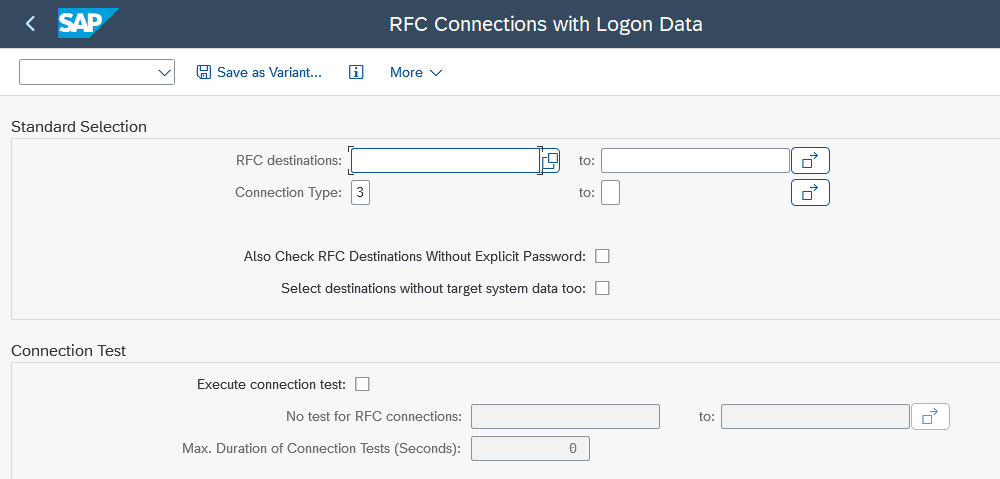
Screenshot of the SAP "RFC Connections with Logon Data" selection screen, showing filter fields for RFC destinations and connection type, checkboxes to include destinations without explicit password or target system data, and a connection test section with options to run tests and set a maximum duration in seconds.
Fig. 2: RSRFCCHK – Selection screen[

Note!

Server-Side Analysis with ST03N

Using the statistical data from transaction ST03N, you can analyze which function modules have been called on your system. This perspective also shows you access from systems outside your SAP landscape – such as Java applications or external partners.

Here is how to run the analysis with ST03N:

  1. Launch transaction ST03N.

  2. In the left panel, select a time period for the total system load (monthly).

  3. Navigate to the RFC server profile.

  4. In the “Users” tab, filter for technical users.
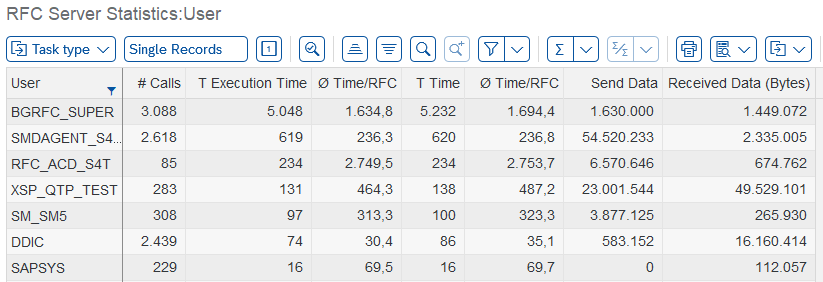
Table titled "RFC Server Statistics: User" listing SAP users such as BGRFC_SUPER, SMDAGENT_S4, RFC_ACD_S4T, XSP_QTP_TEST, SM_SM5, DDIC, and SAPSYS, with columns for number of calls, execution time, average time per RFC, total time, send data, and received data in bytes. Caption: Breakdown of SAP RFC server statistics by user, showing call counts, execution times, and data volumes sent and received.
Fig. 3: ST03N – RFC server statistics: Users

→ By double-clicking a username, you see in the detail view which function groups were called from which system. This allows you to validate whether actual usage aligns with the intended scenario.

SAP "RFC Server Statistics: User" drill-down screen for user BGRFC_SUPER, listing reports and transactions such as CL_BGRFC_SUPERVISOR_START and CL_BGRFC_DAEMON_DEL_TIMED_LOCK alongside their RFC destination, RFC user, local server name, remote server name, name of the RFC program, and number of calls.
Fig. 4: ST03N – RFC server statistics: User details

In the “Remote Server” tab, you can also view all clients that have communicated with your system. By comparing this with the client-side analysis, you can quickly identify whether unknown systems are also accessing your function modules.

Table titled "RFC Server Statistics: Remote Server" listing remote server names such as sd1750010_S4T_10, sd1750010, SD1750001_ACD_20, gclst357_SM5_00, and appserver-ptmb8, with columns for number of calls, execution time, average time per RFC, total time, send data, and received data in bytes.
Fig. 5: ST03N – RFC server statistics: Remote server

Using the Xiting RFC Freeware Tool

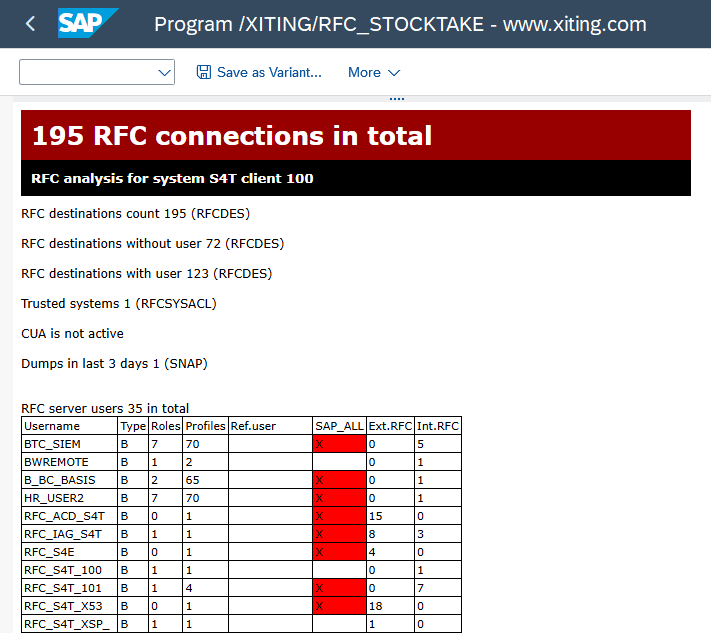
With our freeware tool Xiting RFC Stocktake, this type of analysis can also be performed. Here you can work as well in a central mode and evaluate your entire SAP system landscape at the push of a button.

This saves considerable effort in larger landscapes and eliminates documentation errors. In addition, the Xiting RFC Stocktake can evaluate the entire time period – rather than just individual months – of statistical data and immediately highlight SAP_ALL assignments in color.

Screenshot of the Xiting program /XITING/RFC_STOCKTAKE showing an RFC analysis for SAP system S4T client 100, with a total of 195 RFC connections, a breakdown of destinations with and without users, trusted systems, and a user table listing type, roles, profiles, SAP_ALL flag, and external/internal RFC counts for accounts such as BTC_SIEM, BWREMOTE, and RFC_ACD_S4T.
Fig. 6: Xiting RFC Stocktaker

Optimizing SAP RFC Connections

Finally, you can remediate the vulnerabilities identified in the RFC architecture and close the critical security gaps.

Over the years, a best-practice approach has been established that you can use as a guide:

First, you should replace generic users – such as DDIC or SAPCPIC – with dedicated users. If you use generic users, they are often stored in multiple calling systems, making it difficult to authorize them with tailored roles.

The following guidelines show you how many new users to create and which architecture to use:

  • Introduce RFC interface users that cover one RFC scenario. A sensible naming convention is RFC_<scenario-name>.

  • Introduce RFC interface users separated by calling system. A sensible naming convention is RFC_<SID>.

  • The two approaches above can also be combined. In this case, users are best named RFC_<SID>_<scenario-name>.

After creating the users on the server, you must enter them in the associated destinations on the client side.

With this separation, you have ensured that, going forward, you only authorize what a calling system or scenario actually requires. At the same time, the username itself already documents the purpose. As a result, your interface users will ideally no longer be over-authorized and misused users can be quickly identified.

Conclusion

Yes, optimizing your RFC interface architecture is technically and organizationally demanding. Nevertheless, it is essential – because it closes one of the most serious security gaps and is therefore a mandatory step toward audit-proof system landscapes.

RFC connections affect the entire SAP system landscape, and deficiencies at the interface level can cause significant financial damage. Our Xiting Authorizations Management Suite takes a considerable amount of that workload off your plate, so you can implement the process securely, straightforwardly, and with full documentation. In addition, our tools Xiting RFC Stocktake and RFC Monitoring Tool help you carry out a subsequent authorization redesign of technical users based on the need-to-know principle.

Need support with your RFC interface management?

With our established service “Authorization Optimization for RFC Interface Users” you receive comprehensive support and consulting for RFC remediation.

>> Contact us today – free of charge and without obligation – and soon enjoy clean SAP RFC connections.

FAQ

Which Table stores RFC Connections?

All RFC connections are stored in the database table RFCDES. You can query this table using transaction SE16 to export connection information for documentation or cross-system analysis. The table contains technical parameters, target system information, and connection settings.

The authorization object S_RFC controls which function modules an RFC user is permitted to call on the target system. It checks access to function groups or individual modules. A wildcard authorization (*) grants the ability to call all RFC-enabled function modules – a significant security risk that you should avoid by implementing granular authorizations.

Transaction SM59 is the central tool for managing RFC connections. Here you create new connections, maintain logon credentials, and test the availability of target systems. For analyzing existing connections, report RSRFCCHK is a useful addition – it provides a clear overview of all destinations along with their logon data.

Stay up to date.

Sign up for the newsletter to receive more information.

Follow @Xiting and @xiting.global on social media.

Get in touch now!

Melden Sie sich jetzt an!

Nehmen Sie jetzt Kontakt auf!